Commuter Benefits Account Claim Form

This commuter benefits claim form is already structured around the information your team needs to review a claim, and inside Clustdoc it connects directly to a guided workflow with checklists, automated reminders, document tracking, and a central record for every submission.

*Fully customizable & easy to add to your reimbursement checklist
commuter benefits account claim form

Accelerating commuter reimbursement requests with Clustdoc

Most organizations still manage commuter reimbursements through static PDFs or informal email requests and the process breaks down in predictable ways.

Using static forms or legacy tools usually creates a set of operational problems that compound over time: requests arrive incomplete, a receipt is missing, the commuting period is unclear.

Your benefits team has to follow up with the employee to fill in what is missing which delays the review and adds unnecessary steps for everyone involved.

Supporting documents are also hard to track when they come in through multiple channels at once. (receipts get attached to emails, stored in different folders, forwarded between team members.), so keeping everything associated with a single claim requires manual effort that shouldn’t be necessary.

Approval decisions also happen outside the original request. A manager approves reimbursement in an email thread leaving no clear, auditable record of how the claim actually progressed.

As your benefits program grows and more employees participate, this kind of fragmented process becomes harder to manage at scale. Teams spend more time chasing information than they do reviewing it.

A structured commuter benefits claim form like the one we’ve built inside Clustdoc, changes this by ensuring every request comes in complete and documented from the very first submission.

What our commuter benefits claim form template collects

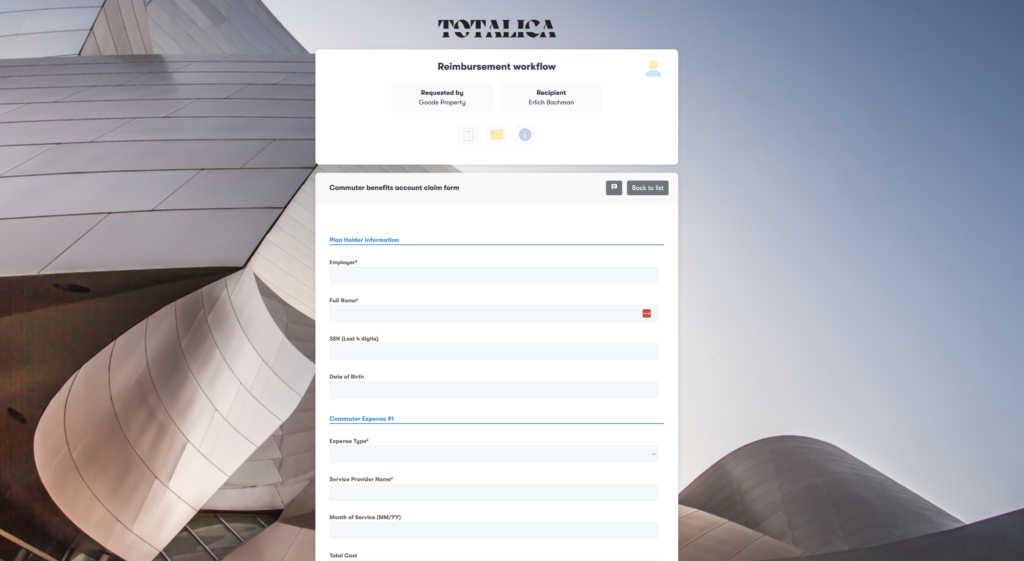
Our commuter benefits claim form template was built to collect the essential details your team actually needs to move employees requests forward. It includes the following fields:

• Employee identification information so your benefits team can connect each reimbursement request to the right employee record.

This is typically the employee name, department and whatever internal identifier your HR or payroll system uses.

• Type of commuting expense being submitted.

Depending on the benefits program your organization offers, employees may be requesting reimbursement for public transportation passes, subway cards, train tickets or parking costs. Knowing the expense type upfront helps your team evaluate eligibility without asking additional questions.

• Commuting period the claim covers.

Some employees submit monthly, others submit individual transportation expenses as they occur. Recording the service period helps your team confirm that each reimbursement aligns with the rules of your program.

• Finally, the form collects the reimbursement amount and asks employees to upload supporting documentation like receipts, tickets or payment confirmations.

These files give your team the evidence it needs to verify that the expense actually qualifies.

When all of this information comes in through a consistent, structured form, reviewing claims becomes straightforward rather than filling in the gaps.

Using this commuter benefits claim form in Clustdoc

Using this template inside Clustdoc, your teams can turn the commuter reimbursement process into a guided workflow and move away from individual form submissions.

→ Employee portal to submit the commuter benefits claim form

Your employees access our custom form through a secure, branded submission page where they can enter their commuting expense details and upload receipts in one place.

Required fields ensure that key information is provided before the claim is even submitted, so employees always know what’s expected and what documents to attach. 

→ Neatly organized employee submission inside your admin console

Once a claim comes in, it doesn’t just land in someone’s inbox to be picked up. Inside Clustdoc, each submission opens a dedicated client record for that employee where everything related to their reimbursement request lives: the completed form, uploaded receipts, supporting documents and full history of what’s been reviewed, requested or approved. 

→ Collaborative reviews and approval process

The review process itself is structured around a checklist that your team works through for each submission.

You can define exactly what needs to happen before a claim moves forward, whether that’s verifying the expense type, confirming the commuting period, checking the receipt matches the amount declared, or validating against your program rules.

Each item on the checklist is tracked so nothing gets missed and every reviewer follows the same process regardless of how many claims come in at once.

→ Automated follow ups and scheduled reminders

Clustdoc also handles the follow up that used to fall on your team to do manually.

If a claim is missing a document or requires more information from the employee, you can send a request from within the platform.

The employee gets a notification, uploads what’s required and the claim moves forward once the requirement is met.

Your team doesn’t have to monitor inboxes or chase anyone down.

Automated reminders take this a step further. If an employee hasn’t completed their submission or uploaded a required document within a set timeframe, Clustdoc will send them a reminder without anyone on your team having to think about it.

The same applies to internal review steps: if a claim has been sitting at a particular stage longer than expected, the right person gets nudged to act.

→ Dashboard and activity tracking

Throughout the whole process everyone has visibility into the status of each claim.

Your benefits administrator can see what’s under review, what’s approved and what’s waiting on the employee to provide something.

Finance teams can pull a consolidated view of all active and completed claims without having to ask anyone for a status update.

And employees can check the progress of their own submission without sending a follow up email.

By the time a claim is approved your team has a complete, auditable record attached to that employee’s file: the original submission, every document uploaded, each review step completed and the final decision.

For benefits reconciliation, compliance reviews or internal audits that history is already organized and ready to reference.

Start managing commuter reimbursements the right way

Using this commuter benefits account claim form inside Clustdoc, it becomes a complete reimbursement workflow where claims are submitted correctly the first time, reviewed efficiently, and tracked from start to finish without any of the usual back-and-forth.

If your team is ready to stop managing commuter reimbursements manually, this template is the place to start.

commuter benefits account claim form

In Clustdoc, the form is configured as part of a guided submission flow where required fields and supporting documents must be provided before submission.

You can create custom rules around your flow (including due dates etc) to drive higher conversion rates and make sure the form is completed on time.

This ensures that each claim reaches your team in a review-ready state, without the need for follow-up.

Yes, we know that in many organizations, reviewing a commuter benefits account claim form involves multiple stakeholders, from HR to payroll or external administrators. 

Within Clustdoc, claims can be routed through predefined review steps, where each stakeholder accesses the same submission, adds comments if needed, and validates their part of the process. 

In Clustdoc, each claim remains linked to its supporting documents, review actions, and approval decisions within the same workspace. Every submission creates a complete, time-stamped record of the reimbursement process, making it easier to retrieve historical claims or respond to internal controls and compliance checks.

Forms adding operational overhead to your teams?

Try Clustdoc today, launch your new workflow  tomorrow.